The Spectra Shopify Theme is designed to provide an exceptional product page experience for users. With an emphasis on ease of use and accessibility, the Spectra theme offers a modern, app-like product page that enhances user interaction, reduces friction, and boosts conversion rates. This product page layout is inspired by top e-commerce marketplaces, ensuring that all important elements are immediately visible to your customers without requiring endless scrolling.
5.1 Customizing Product and Collection Pages with Spectra
Product pages are the heart of your store, and Spectra ensures they are optimized for success. With built-in features, Spectra allows for significant customization while keeping things simple, ensuring your products are presented in the best possible light.
Product Images: Spectra comes with a built-in feature that allows you to upload high-quality images with a zoom function, giving customers a closer look at product details effortlessly.
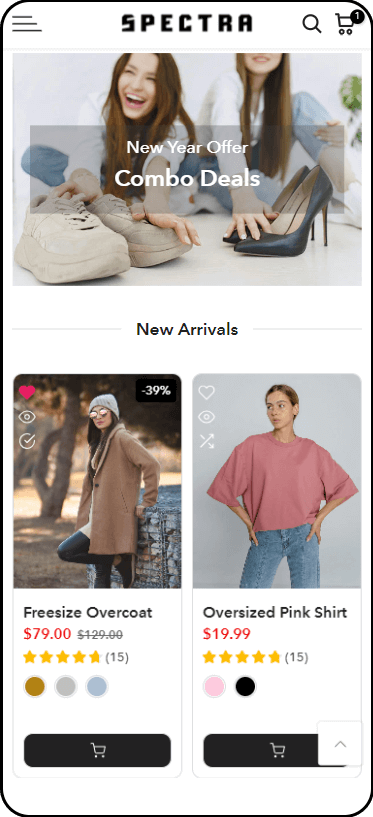
Badges: You can add sale, new, or exclusive badges to products to highlight special offers or newly launched products.
Tabs: The theme automatically organizes information with pre-built tabs for product details, additional information, and customer reviews, keeping your product pages clean and easy to navigate. If you want, you can also manually add more yourself.
Product Filtering: Spectra includes advanced filtering options, such as size, color, and price on collection pages. These built-in filters help customers find exactly what they’re looking for, ensuring a seamless shopping experience.
5.2 Key Features of Spectra’s Product Page
- App-Like Layout:
Spectra’s product page mirrors the design of popular marketplace apps, making it easy for users to find everything they need at a glance. All the essential product details and actions, such as images, title, price, color/size variations, quantity selector, and “Add to Cart” button, are positioned within reach, creating a seamless shopping experience.
- Product Images and Gallery:
The product image gallery is placed prominently at the top of the page, featuring a high-quality, zoomable image. Additional product images are displayed as thumbnails, allowing users to swipe through and explore different angles or variations of the product with ease. This helps customers make informed decisions, increasing trust and reducing returns.
- Quick Variant Selection:
Variants such as colors, sizes, or materials are conveniently positioned near the product image. Customers can easily switch between different variants without the need to scroll up and down the page. Each variant change dynamically updates the product image to reflect the customer’s selection, offering a more interactive and immersive shopping experience.
- Quantity Selector:
The quantity selector is located right next to the product variants, making it simple for users to increase or decrease the quantity of items they wish to purchase. This ease of access can drive larger purchases as customers don’t need to leave the main product details area.
- “Add to Cart” & “Buy Now” Buttons:
These essential buttons are placed front and center to encourage immediate action. The “Add to Cart” button is large and inviting, while the “Buy Now” button is an option for those looking to purchase the product directly without adding it to the cart. This dual approach caters to different buying behaviors, reducing friction in the checkout process.
- Product Reviews and Ratings:
Social proof is crucial to boosting sales, and Spectra’s product pages feature a built-in rating system near the product title. Customers can see how well a product is rated, encouraging trust in the product and your store. Below the fold, you’ll find customer reviews, which provide detailed feedback and further promote trust.
- Sticky Add to Cart on Scroll:
As customers explore more detailed product descriptions, specifications, or customer reviews, Spectra ensures that the “Add to Cart” button remains visible through a sticky header. This design feature keeps the primary CTA within reach, reducing the effort required to add a product to the cart, even if customers are scrolling through long product pages.
- Dynamic Pricing and Discounts:
Spectra’s product page supports dynamic pricing, which automatically reflects any discounts or sale prices applied. This ensures that customers see the most current price without having to navigate elsewhere. Discount badges and countdown timers can also be integrated to create urgency and drive sales.
- Integrated Upselling and Cross-Selling:
Right below the product information, you can display related products or frequently bought together items, encouraging customers to add more to their cart. This built-in upselling feature is crucial for boosting your average order value.
- Customizable Sections:
You have the flexibility to add more sections such as product specifications, detailed descriptions, size guides, or shipping information without disrupting the page’s flow. These sections are expandable, giving customers more in-depth information while keeping the layout neat and concise.
- Mobile-Optimized Design:
Spectra’s product page is built to provide a smooth and intuitive experience on mobile devices. The app-like layout shines here as it condenses all product information into a single screen, making it easy for mobile shoppers to make decisions without unnecessary scrolling.